yeah, it's a decent enough compromise for now. but it would be nice if 3FF did turn porta off completely, so i think that would be a good change. i guess the only way to enable note retriggering while using porta is to put in note cut/releases. which would be a nuisance sometimes, cuz it makes notes more staccato. i guess people will have to live with that though, because otherwise this is the best solution.
As I've stated in the 0.3.7 beta thread as part of the otherwise out-of-topic discussion, I'd like to see MP3 export in a new release (it sure beats going through the hassle of doing multiple steps to create a smaller music file for uploading on the net or using on portable media players).
_______________________
Technology: the one thing that's hated & cursed at by all engineers, technologists, scientists & technicians!
As I've stated in the 0.3.7 beta thread as part of the otherwise out-of-topic discussion, I'd like to see MP3 export in a new release (it sure beats going through the hassle of doing multiple steps to create a smaller music file for uploading on the net or using on portable media players).
i know it's so tuff to open razorlame and click ENCODE
mm yeah the more i think about it, the more i reckon it'd be a bad thing to add. because if mp3 export is added people then need a means to input the encoding settings. and then people want ogg and flac export too, etc. it isn't too hard to do externally from famitracker.
it's only a hassle to have to make a .wav, convert it, delete it, and then open the new one for whatever use you want it. an .mp3 button is just solving a problem. and, just for curiosity's sake, who of us needs .ogg, or .flac (?) anywho?
Actually, many people use Ogg Vorbis & FLAC (even though Ogg Vorbis is mostly used in video editing while FLAC hasn't even caught on in the music & video industries).
_______________________
Technology: the one thing that's hated & cursed at by all engineers, technologists, scientists & technicians!
I have had a look; it's only a handful of devices & only a smaller cabal of companies that use FLAC because it's royalty-free (though not even an official industry standard by any standardization committee, unlike MPEG standards).
Actually, the use of FLAC for the most part is still heavily limited because FLAC, being a non-standard, open-source format created only 3 years ago, still hasn't been officially adopted as a standard in industrial music & video production (i.e.: only a handful of hardware devices like portable players & possibly even DVD players support FLAC, whereas most devices accept the current industry standards set by MPEG). It FLAC actually were a complete rival to MPEG standards, there definitely would be no need for additional codec packs or 3rd party media players for the most current Windows OS (as full support for it would be built into Windows Media Player) & the vast majority media devices would support it (in reality, most support MPEG standards only & only a small number by certain electronics companies provide otherwise mediocre support for open-source formats like FLAC, Ogg Vorbis or Matroshka).
I really do hope FLAC catches on much better, though.
_______________________
Technology: the one thing that's hated & cursed at by all engineers, technologists, scientists & technicians!
it's only a hassle to have to make a .wav, convert it, delete it, and then open the new one for whatever use you want it. an .mp3 button is just solving a problem. and, just for curiosity's sake, who of us needs .ogg, or .flac (?) anywho?
it takes a matter of seconds. if you set your encoder up properly, you can have it delete wavs automatically, and use preset settings that you never have to look at more than once. it isn't hard. adding encoder export does raise more problems too, more than it's worth IMO... it's another thing for jsr to keep on top of, updating codecs periodically and blahblah. honestly, the wav export is sort of there as an afterthought as it is (it doesn't work faultlessly.) the tracker is only really meant to shit out NSFs.
as for people who use OGG and FLAC --- there are lots of them. people have been demanding lossless, particularly FLAC, for years. many sites sell them. if you release anything major these days you can bet someone will make noise if it isn't available in lossless. so it's more popular than is being claimed.
OGG on the other hand is often desired for how much better it copes with low bitrate settings, and that it's patent-free (two reasons why it's great for game developers.)
Open Audacity. Bring WAV file into Audacity. File > Export as MP3 > Done.
As Dave said, Adding MP3 support to Famitracker is problematic for various reasons. It's best just to say it wasn't meant to be used in such a way. Having it export to WAV is good because WAV files are flexible and you can edit or convert them with ease.
Alternatively, you can use a sound recorder to record playback in Famitracker or the resulting NSF file produced from said FTM.
i didnt see this on the list, so i will spit my suggest for the future versions.
SUGGESTS:
* In the DMC editor screen. Made able to edit/control the volume of the samplers.
* Able to edit name of the DMC file.
* Made the Windows screen at the DPCM SAMPLES area bigger or scalable pllzzz XDD
* Something to check what instruments are/arent been in use in the FTM (this will help when you have multi-track files and you delete any of the songs inside)
* Improve the way of linking DMC files to notes. For example, one of the thing is: If you have 8 samples and you want to made all of then LOOP, you have to select 1 by 1 and add the checkmark. if you delete or want to modify/reload/re-import a DMC file and you have it linked to 12 notes, you will have to RE-DO that part again. Instead of that<<< NVM about that, actually it works like that if you KEEP the same name but... Also, Famitracker could keep the link to a file name. So, no matter what you do with the sample/dmc file you can always RENAME it (if that option is added) and you will keep the SAME order/link to each note )))
* Export multitrack NSF to NSFE with the name of each SONG (using the #songs name from Module Properties)
* A LOOP command/effect?? to loop from X part to X part and X times? ***
* Transpose command/effect? a command to transpose the ROW. ***
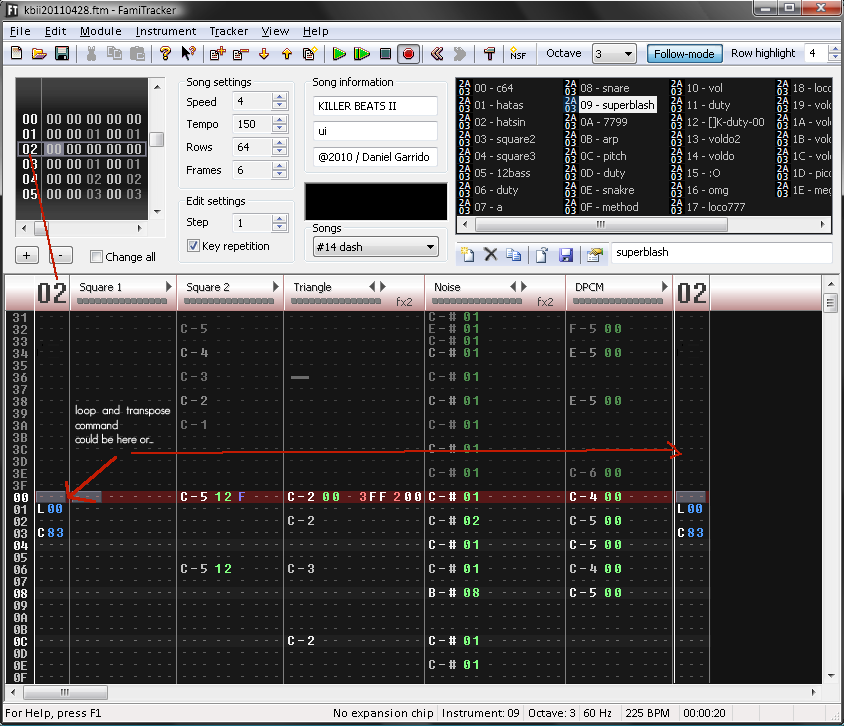
***boths can be in the FRAMES colum. OR in a small ROW colum linked to the FRAME, like i show in the PNG
for example,
LOOP command could be somethign like... L01 = loop the whole pattern 1 time. L00 = loop starts and ends when L00 appears again or something like that.
Transpose command could be like... K183 = K (or any other letter) and 1 = channel 1 (square 1 in this case) and 83 is the number of notes up, starting from 80 which means 0, so you can go up or down with 7A/62/5B or UP with 93/A7/C4, etc... depends of what note you want to go...or more simpler, C83 = C = channel 3 (triangle in this case) and 83 is the number of the notes up.
BUGS:
*The 7xx command seens to be broken again or is acting strange again?
The DMC volume in the editor sounds like a good idea to me. I use Rushjet1's badass DMC converter and it does a great job, but some samples just come out really low (like some Toms I ripped from Tales of Phantasia).
Personally, I would love it if there were keyboard shortcuts for Previous and Next Song (and, ideally, they'd be customizable in the Config control panel).
_______________________
All men are mortal.
Socrates is a man.
Therefore, all men are Socrates.



 )
) 




 )))
)))