Damn I tried it in windows xp compatibility mode and it's working. I really should have tried that before. Needless to say that I'm really glad this is working cause I really like this tracker.
Just wanted to let you know if you don't already, that VGM exporting is broken. When you play VGM's with VGMPlay, it has a timer and loop position, but anything that isn't 50hz has a really messed up timer (I think it depends on the song length before you can see the difference). Also, after some VGM's loop, depending on what's going on, sometimes the re-loop continues playing a note. I'll attach an example of this.
Speaking of loops though, a feature to end the song at a certain point, maybe an effect that halts the pattern editor at a point or something, that'd be nice. Also, it could act as a feature that would make exported VGM's NOT loop.
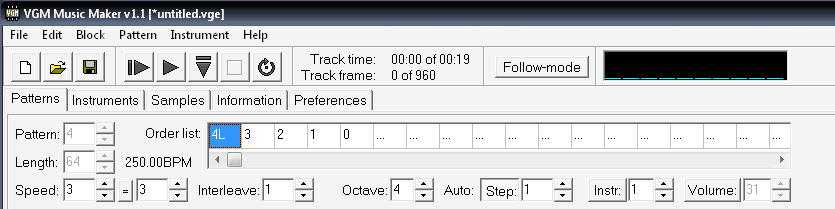
Another thing that would be nice is to add a button or something that inserts a new frame. It could act as "insert new" but instead of inserting a frame with a reverse number, it would advance (like 0, 1, 2, 3 etc.)
Also, that bug that was talked about where the tracker crashes, it only seems to happen when you open a .vge module. Either double clicking it or opening it from in the tracker, half the time it'll crash.
Yours isn't reversed? Here, I'll attach a screenshot of what it looks like when I Insert New.
Also, I wish I could do something about the crash. Would it help if I record a video clip of it crashing and send it to you?
It just looks reversed when used few times in a row, but it is how it should be when you don't move the order cursor. It inserts a new number into the current position, searching for an empty pattern. It is possible to make it appear not reversed by moving the order cursor to the right automatically after an insert. But it only will change the look, it'll work the same otherwise. Try to move the cursor to the next position after an insert to get the idea. If you need to make a growing list of pattern numbers, you can use Edit/Cleanup/Rearrange patterns.
No, video of the crash won't help. I need a way to recreate the crash whenever I want to be able to use debugger. The same for any bug, if I can't see and examine a problem at code level, I can't fix it.
Ok, I understand.
As for the Crash, it is a shame. Too bad there is no crash dump or anything or it could be fixed.
Oh well, at least you can still fix exported VGM's and such I guess.
I have a really annoying problem with running the music files properly in a BasiEgaXorz game...
The every 6th frame is skipped thing renders most of my instruments unusable. (My FM kick drum sound like a wob-wob sound, my crash cymbal doesn't fade out and the noise just continues on for a random period of time)
Now how do you get behind that?
I can only guess, that I have to do something with this section:
tfdPlayFrame:
vTfdFrameCnt++ 'increment frame counter
if TvType()=0 then 'speed compensation for NTSC
if vTfdFrameCnt%4=0 then return
endif
if vTfdWaitCnt then 'skip frames if needed
vTfdWaitCnt--
- Change your instruments to one that will work with this method of speed compensation
- Make two versions of each song for 50 and 60 hz, detect the system and play one that is needed
- Use Z80-based player which will be able to sync with a YM2612 timer rather than TV frames
But why does it have to skip those frames? This sound engine is really great, but this is such a small thing that ruins everything for me, is there any way NOT to skip frames?
EDIT: I seem to have gotten it to work by using ED1 on drums that sounded weird, but I can still hear pops when certain instruments are followed by something else (Kick -> Crash cymbal, Snare -> Crash cymbal. I don't know if it's because they all use different algorythms or there's something wrong with FM channel 6.
To compensate 17% framerate difference between PAL and NTSC, obviously. There is a way NOT to skip frames - just NOT skip them. Replay speed will depend from PAL/NTSC.
Pops are happen just like any digital sound pops, when output level changes suddenly. If you manage to smoothly get output level of a previous note to zero before a new note, there will be no pop.
Oh yeah, that seems to make it better, but could volume commands be the cause of pops too? (My snare drum is played with volume 1A and the cymbal is with 15)
Yes, volume commands and instruments of different volume could cause pop too if the volume changes suddendly and too much. Can't give exact numbers, it depends from many factors, but generally larger the step, more noticeable the pop.