Quote:
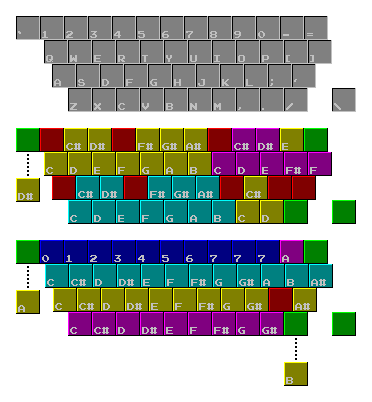
Legend/Key
Keyboard:
- Up: Regular QWERTY keyboard layout
- Mid: FastTracker 2/Impulse Tracker keyboard layout
- Down: Modplug Tracker keyboard layout
Keys:
- Red: Unused.
- Green: Default keys for note cut '\', clear field '=', repeat '`' and note release '/' (0.3.5. exclusive). Some notes might be 'revealed' after one changes these special keys.
- Blue: Octave keys. Exclusive in Modplug layout. Changes the octave of the current note on the cursor without changing its key.
- Cyan: Keys in the current octave.
- Yellow: Keys in the second octave counting from the current one.
- Magenta: Keys in the third octave counting from the current one.
- Broken line: Indicators of keys hidden by the default four special keys.